
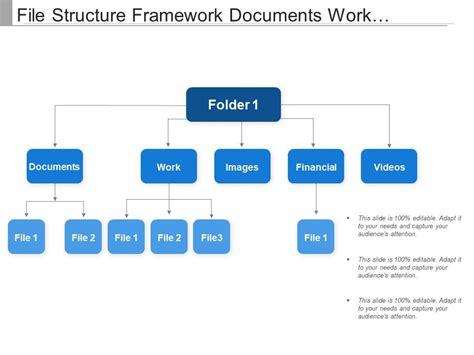
In many teams, digital assets live in a sprawling maze of folders that slows work, hides critical files, and forces repetitive reorganization. A well-designed Folder Structure Framework can turn that chaos into clarity by establishing a consistent, scalable map for every asset. This article explores the saga from confusion to order and shows practical steps to implement the framework across teams and tools.
Whether you manage project docs, media assets, or code artifacts, the core idea is to align where you store things with how you work. The Folder Structure Framework offers a repeatable approach to naming, organizing, and governing folders so that new hires can contribute with less ramp-up time and seasoned teams can scale without fracturing the archive.
Key Points
- Clarity starts with consistent naming and a predictable hierarchy that scales with your needs.
- Automation and templates reduce manual errors as part of the Folder Structure Framework.
- Use semantic top-level folders and subfolders to reflect workflows and ownership.
- Document conventions and governance to maintain long-term cleanliness.
- Review and iterate: schedule periodic audits to preserve clarity as teams evolve.
Benefits of the Folder Structure Framework
The framework helps teams locate files faster, reduces duplication, and improves collaboration. By standardizing where assets live, you remove guesswork from onboarding and daily searches, turning scattered folders into a reliable map.
Tip: Start with the fewest top-level categories that cover your primary workflows, then expand only when needed.
Core Principles of the Folder Structure Framework
Consistency in naming and folder levels reduces cognitive load and speeds search across the repository.
Scalability design for growth so the structure remains navigable as more teams and assets are added.
Context ensure top-level folders reflect major workflows, with subfolders aligned to tasks and projects.
Governance establish who can modify the structure and how changes are communicated.
A Step-by-Step Playbook for Implementation
1) Define the top-level categories based on your primary workflows, functions, or domains.
2) Create consistent, descriptive folder names that reflect content and avoid ambiguous abbreviations.
3) Implement lightweight documentation that explains the folder rationale and naming rules.
4) Build templates for common project types to reduce drift and speed up setup.
5) Schedule quarterly audits to review usage, prune stale material, and adapt to evolving needs.
Case for Governance and Tools
A Folder Structure Framework often pairs with governance policies and automation. Pair a simple metadata file or a readme in each top-level domain with lightweight automation (e.g., scripts or bots) to enforce naming and empty-folder cleanup. This combination keeps the structure reliable without slowing teams down.
How do I start implementing a Folder Structure Framework?
+Begin with a cross-functional discovery to map key workflows, identify top-level domains, and agree on naming conventions. Pilot the framework with one team, collect feedback, and iterate. Document decisions so new contributors can follow the map quickly.
What naming conventions work best for folder structures?
+Use concise, nouns for domains, avoid dates in names, and pick consistent separators (like hyphens). Keep names stable to prevent frequent updates, and reserve a short glossary for any acronyms.
How often should the structure be audited?
+Run quarterly reviews to prune stale folders, adjust naming, and incorporate new workflows. Assign a folder structure steward or small committee to maintain governance and answer questions.
Can this framework be applied to cloud storage and local drives?
+Yes. The same principles apply across platforms. Treat cloud storage and local drives as a unified namespace by mirroring hierarchy and ensuring consistent naming, with platform-specific adaptations as needed.
How do I measure success with the Folder Structure Framework?
+Track metrics like average time to locate a file, frequency of duplicate assets, and user satisfaction. Regular audits should show a reduction in search times and clearer ownership of folders.